Step 1: Publish a Group Listing
Open the MERIT Q-App inside Qortal. Select your registered Qortal name. Fill in your group details — name, location, format, focus areas, description. Publish the listing as a QDN JSON resource. Your group is now discoverable in the decentralized directory.
Step 2: Claim or Verify Your Listing
If your group already appears in the directory, claim it by publishing a claim record from your Qortal name. Worldwide Brotherhood stewards review claims and update verification status. Verified groups appear with a verified badge on the directory and website mirror.
Step 3: Create a Circle Profile
Go beyond a basic listing. Create a MERIT circle profile with your covenant, steward, meeting rhythm, member roster, and public trust surface. Link your circle to a Qortal group for member coordination and chat.
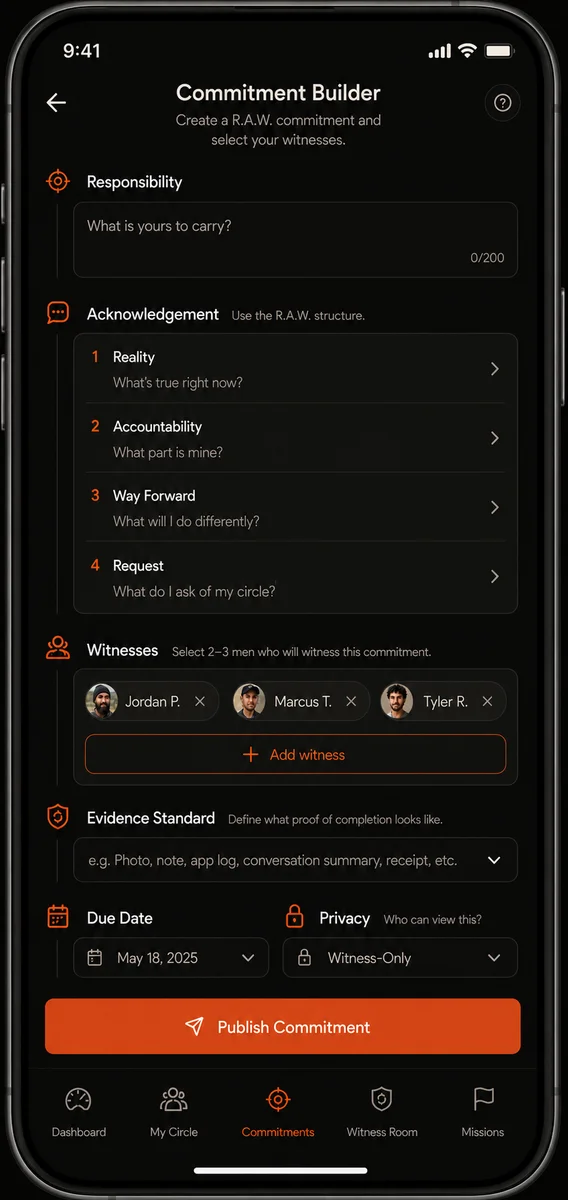
Step 4: Make a R.A.W. Commitment
Use the Commitment Builder. Name your responsibility. Write your acknowledgement. Set a due date. Choose your evidence standard. Select your witnesses by Qortal name. The commitment is encrypted for your witnesses and published as an encrypted QDN record.
Step 5: Invite Witnesses
The Q-App notifies your selected witnesses via Qortal chat. They receive the encrypted commitment, review it, and wait for your evidence. Witnesses can ask clarifying questions through the Witness Room.
Step 6: Return with Evidence
At the due date, return to the Q-App. Upload or describe your evidence. Mark the commitment as completed, partially completed, or honestly not completed. The second outcome is workable. The third — avoidance or dishonesty — is corrosive to trust.
Step 7: Receive Witness Attestations
Your witnesses review the evidence and publish attestations. They do not certify that you are 'good.' They certify something narrower: 'I witnessed this commitment. I reviewed the evidence. I attest that the stated outcome was completed / not completed / partially completed.' This narrowness keeps MERIT honest.
Step 8: Build Your Trust Surface
Over time, your circle dashboard shows patterns: commitments made, commitments completed, honest resets, service missions contributed, confidentiality maintained. This is not a score. It is a trust surface — a pattern of witnessed behavior across domains. No single number. No public ranking. Just proof that you can be counted on.